How it works
pyappdist installs your app into a real Python runtime and ships that runtime. There is no freezing and no code analysis.
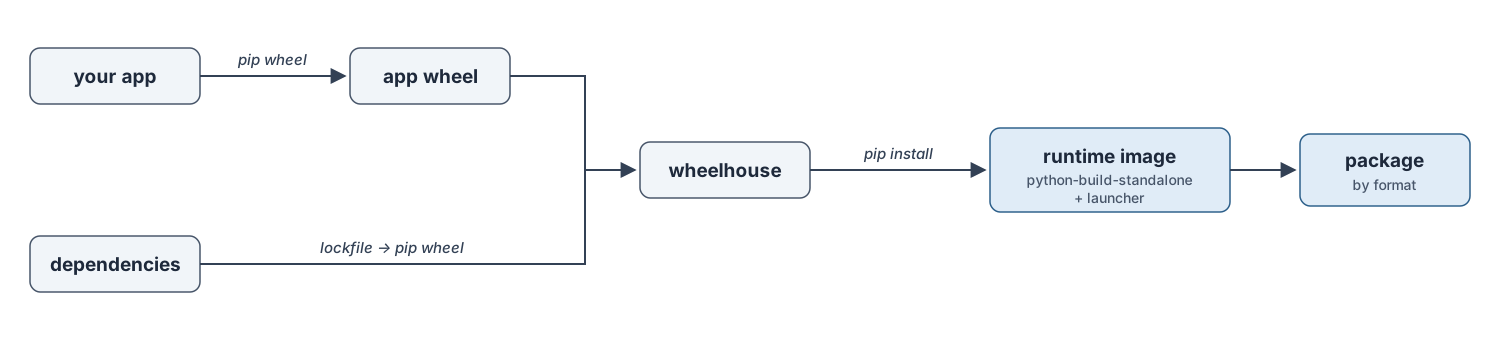
The image — a self-contained, ready-to-run directory — is built the same way for
every target. Only the final packaging step branches by format.
What your project must satisfy
pyappdist installs your app the same way pip would — it builds wheels and
installs them into the bundled runtime, it never freezes source files directly.
Two things about the project therefore have to be true before it can be packaged.
1. The project must build a wheel with pip
Your app must be a proper installable package, not a loose collection of scripts. Concretely, running
pip wheel --no-deps .
in the project directory must succeed and produce a .whl file. Any modern
build backend works (setuptools, hatchling, flit, poetry-core, …) as long as
pyproject.toml declares a [build-system] and pip wheel can build it.
If pip wheel fails — or there is no packaging metadata at all — pyappdist
cannot distribute the app.
2. Each launcher must run from the installed wheel
A launcher never executes a source file by path. It runs against the installed package, in exactly one of these two forms — which one is chosen by the launcher’s entry:
python -m <module>— used whenentryhas no colon ("myapp.cli").python -m <module>must work once the wheel is installed.python -c "import sys; from <module> import <callable>; sys.exit(<callable>())"— used whenentryis"module:callable"("myapp:main"). The callable must be importable from the installed package and callable with no arguments; thesys.exitmakes its return value the process exit code. (The launcher additionally passes-Ito isolate the app from the user’s environment.)
The easiest way to confirm both conditions is to reproduce what pyappdist does, in a throwaway virtualenv:
python -m venv /tmp/check && /tmp/check/bin/python -m pip install .
/tmp/check/bin/python -m myapp.cli                          # entry = "myapp.cli"
/tmp/check/bin/python -c "from myapp import main; main()"   # entry = "myapp:main"
If those run from the installed package, the corresponding launcher will work. If they only work in your source checkout (because they read files that the wheel doesn’t include, or import a top-level script that isn’t part of the package), fix the packaging first — the launcher would fail the same way.
The pipeline
App wheel. Your project is built into a wheel with
pip wheel
--no-deps
using its own PEP 517 backend (so any backend works).Dependency wheels. Dependencies are pinned from your project’s lockfile, exported to a dependency file (a PEP 751
pylock.tomlfor uv, arequirements.txtfor the other managers), and turned into wheels by the target runtime’spython(pip wheel -r). Resolving on the target interpreter keeps environment markers and wheel tags natively correct. See Dependency resolution.Runtime. A python-build-standalone runtime for the requested version is downloaded, verified against its
SHA256SUMS, cached, and extracted.Image. Every wheel in the wheelhouse is installed into the runtime offline (
pip install --no-index), and the standard library / site-packages are byte-compiled. The result is a self-contained, ready-to-run directory.Launcher. One launcher per
[[tool.pyappdist.launchers]]entry. On Windows it is a small C stub (launcher.exe) compiled with MSVC; for a macOS.appit is a compiled Mach-O stub (clang); for Linux and the macOS.runit is a relocatable shell wrapper. Either way it starts the bundled interpreter and runs your entry point.Packaging. The image is turned into the target’s package: an
.msior.msixon Windows, a self-extracting.runon Linux/macOS, or a.appbundle (optionally wrapped in a.dmg) on macOS. See the per-format pages under Output formats.
The launcher
One launcher per entry point starts the bundled interpreter and runs your code. The kind depends on the target format, not just the OS.
Windows (.msi / .msix) — a thin C process (launcher.exe), not an
embedded interpreter:
It spawns the bundled
python.exe/pythonw.exewith-I(isolated mode) and stripsPYTHON*environment variables, so the user’s environment cannot interfere.Because it never embeds
pythonXX.dll, there is no C-API version coupling — the same stub works across Python versions.App-specific values (the interpreter path, the bootstrap program, fixed arguments, icon, and version resource) are baked into a generated header and
.rcresource at build time; the C source is never edited.
macOS app bundle (.app / .dmg) — a compiled Mach-O C stub (built with
clang) at Contents/MacOS/<name>. It execs the bundled interpreter under
Contents/Resources/python with the same isolated-mode bootstrap. Like the
Windows stub it embeds no interpreter, so it is decoupled from the Python C-API;
app-specific values are baked into a generated header at build time.
Linux, and macOS .run — a relocatable shell wrapper that
resolves its own location and execs the bundled interpreter with the same
isolated-mode bootstrap — no compiler needed.
GUI startup errors (Windows)
GUI launchers run under pythonw.exe with no console, so a failed import would
otherwise vanish silently. For gui = true launchers, pyappdist wraps the
entry-point import in try/except and, on failure, shows the error in a
message box (via ctypes). Exceptions raised after your entry point starts
running are your app’s responsibility.